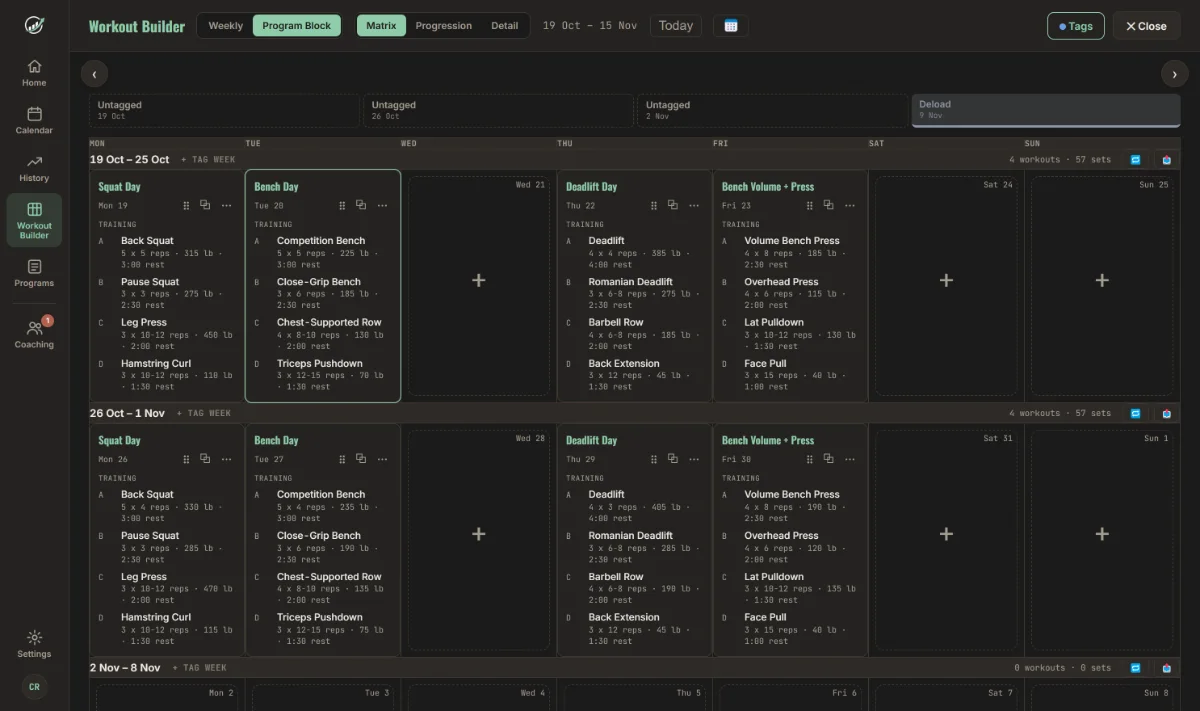
Every week of the block, at a glance
The Matrix lays a block out like a training calendar. Weeks run down the page and days run across. Each session lists its lifts with sets, reps, load and rest, so you see the shape of the cycle before you read a single number.
- Weekly totals for workouts and sets, so a volume spike stands out immediately.
- Tag weeks as Deload, Peak or Test Week, or write your own. Tagged weeks are shaded across the whole block.
- Drag a session to another day, or copy it to the same day next week with one click.
- Repeat a week to carry a full week forward, then adjust what changes.
Edit it like a spreadsheet
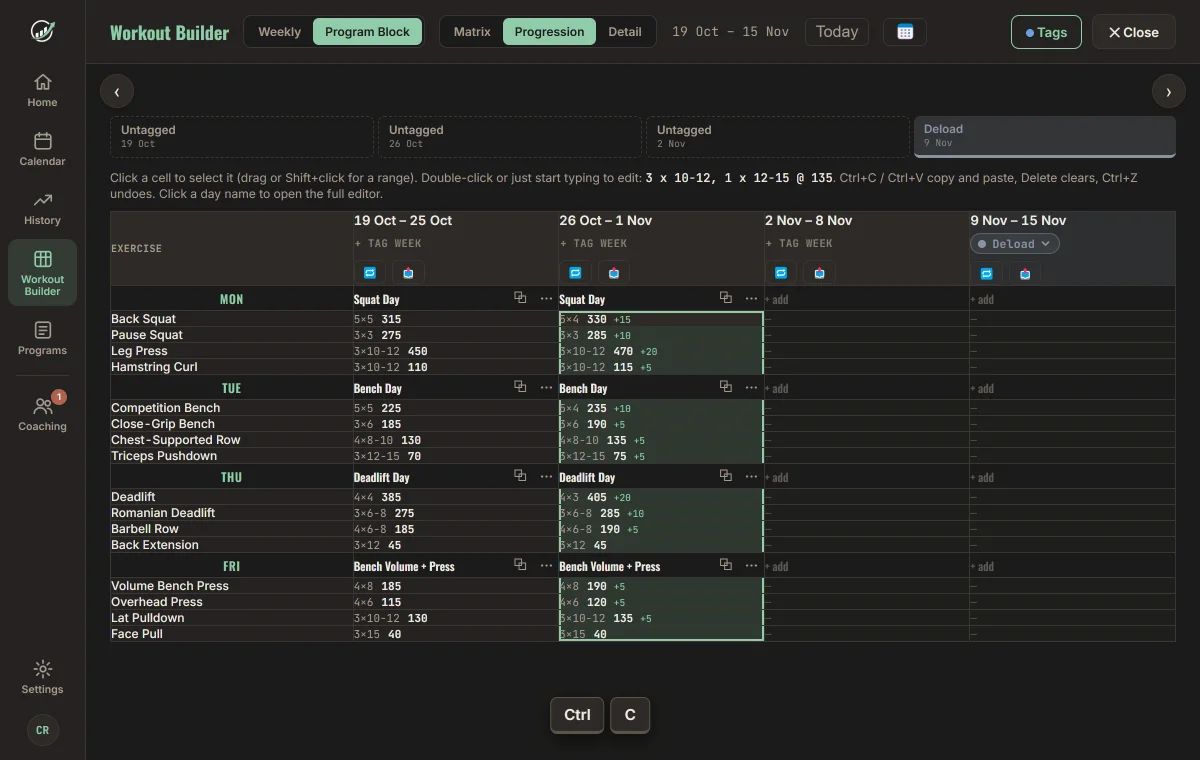
Flip to Progression and the grid turns on its side: exercises down, weeks across. Each cell shows sets, reps and load, with the change from the week before. Waves, step loading and deloads become numbers you can scan.
- Select a range by dragging, or with Shift and the arrow keys. A whole column of one week selects in one drag.
- CtrlC then CtrlV pastes that week into the next. Pasted days take the source day's name.
- Type straight into a cell:
5 x 3 @ 345sets five sets of three at 345. Use3 x 5, 1 x 8for a top set plus a back-off. - Delete clears cells and CtrlZ undoes it. Sessions a lifter has already logged are never overwritten.
- Copies are tab-separated text, so they also paste to and from Excel and Google Sheets.
Turn a spreadsheet day into a workout
Keep writing programs in a sheet if that is where you think. Paste a day into Progress and it builds the sections, supersets, sets, reps and rest times for you.
What it reads
- Sections from
Add Section: Warm-uplines, and the workout name fromName Workout:. - Supersets when exercises share a letter, so C1 and C2 are linked.
- Mixed schemes on one line, like
5 x 3, 1 x 8for top sets and a back-off set. - Rep ranges such as 10-12, and rest as
180 sec restor2 min rest.
Weights are added afterwards, in the grid or the day editor.
Build once, assign to every lifter
Save a block to your program library, then send it to one lifter or twenty. Pick a start date and every workout lands on their calendar.
A real program library
Search, sort and reuse every block you have written. See each block’s weeks, which lifters are on it, and a preview of its first week without opening it. Duplicate a program and adjust it for the next lifter.
Assign to many at once
Tick as many clients as you need. The dialog shows exactly which dates the program will run.
Queue it before they join
Invite a lifter and attach a program to the invite. It is applied automatically when they accept.
See who is on track before they tell you
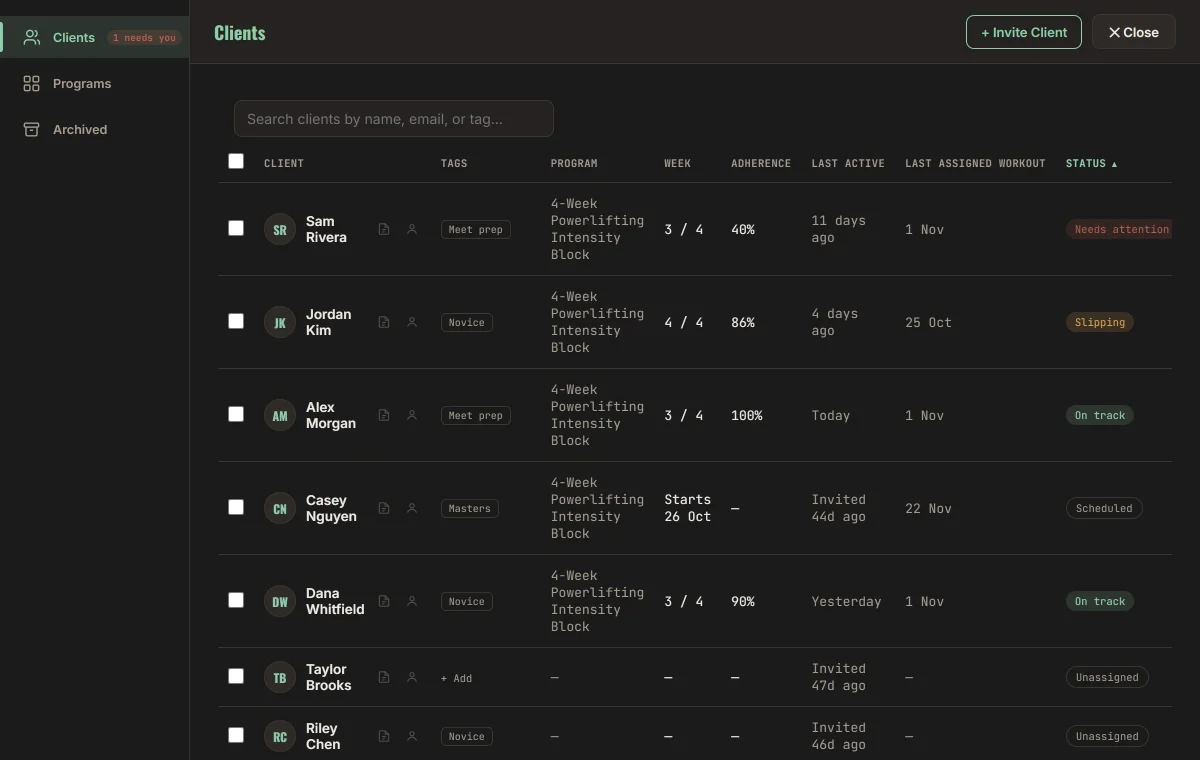
Once a program is running, the roster shows how each lifter is actually doing against it, so you spend your time on the people who need you.
- Adherence to the assigned block, current week, and when each lifter last trained.
- Status flags for On track, Slipping and Needs attention, plus Scheduled and Unassigned.
- Tags and private notes for meet dates, injuries and preferences. Lifters never see your notes.
- Edit their calendar directly in the same builder when plans change.
Start the day with the numbers that matter
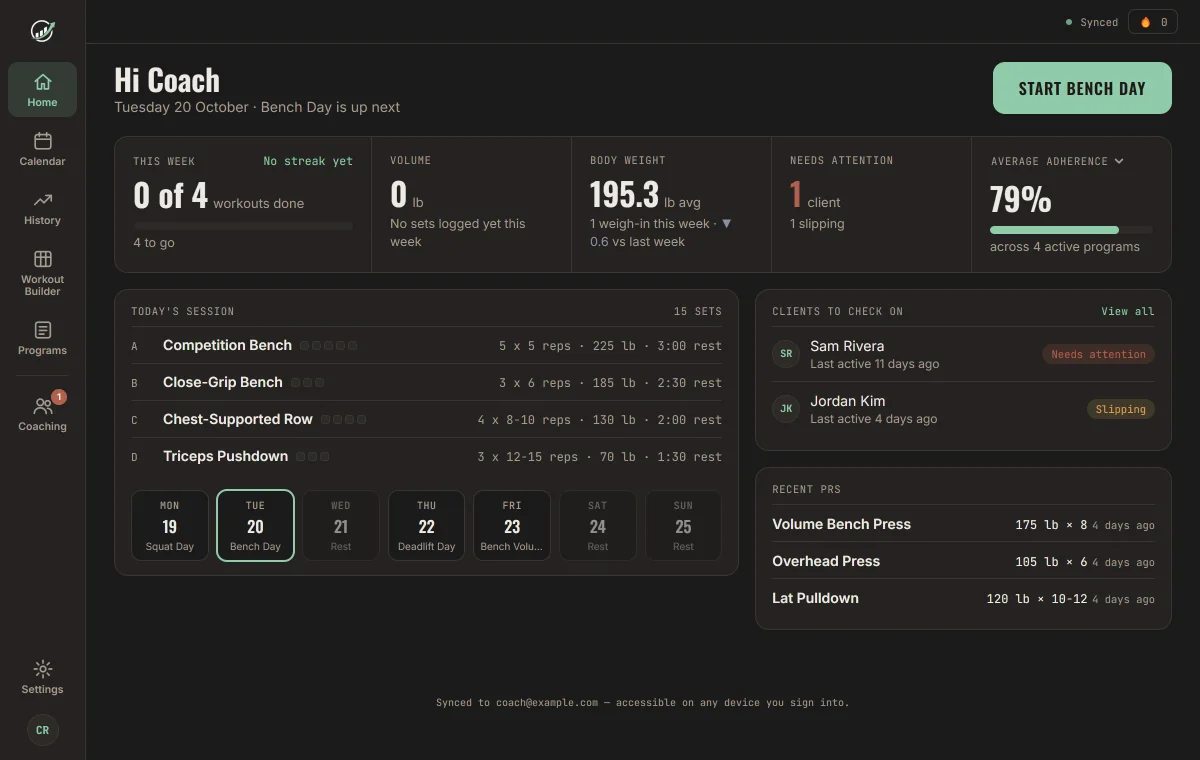
Home is the first page you see on desktop. One stat ribbon shows your week, volume and bodyweight alongside how many clients need you, and one card is yours to choose.
- One button to train. Today's session sits right under Start, with the week laid out below it.
- Pick your own metric. Click the title of the last card to switch between average adherence, programs ending soon and workouts completed. Your choice is remembered.
- Clients to check on lists who is slipping or needs attention, with when they last trained.
- Recent PRs and bodyweight stay in view, because coaches train too.
A clean phone app for training day
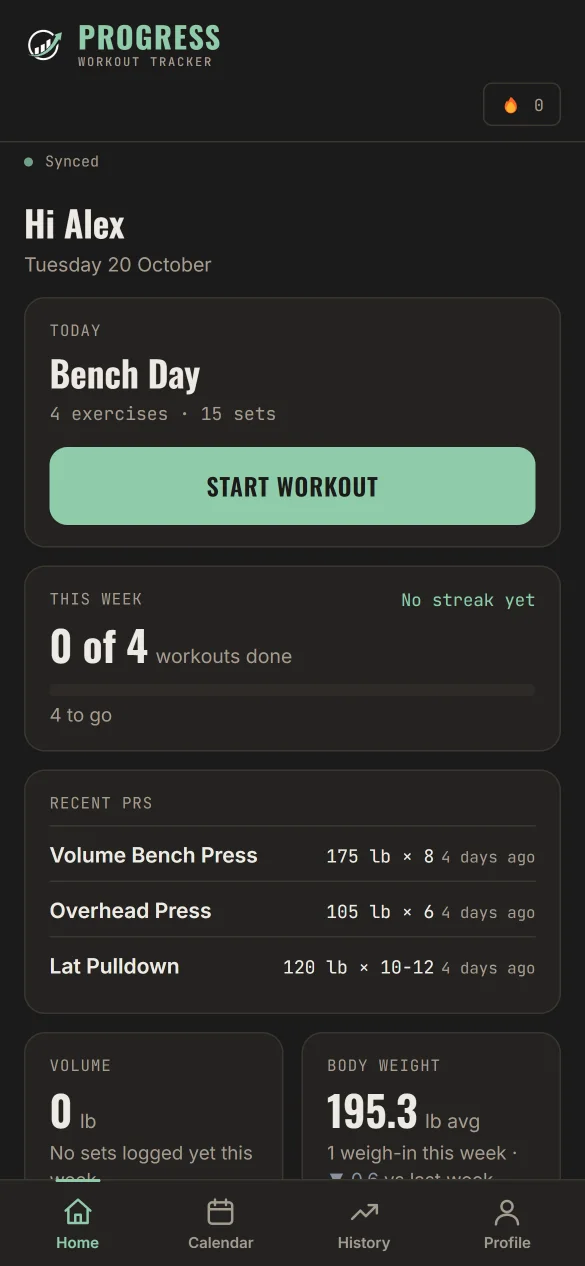
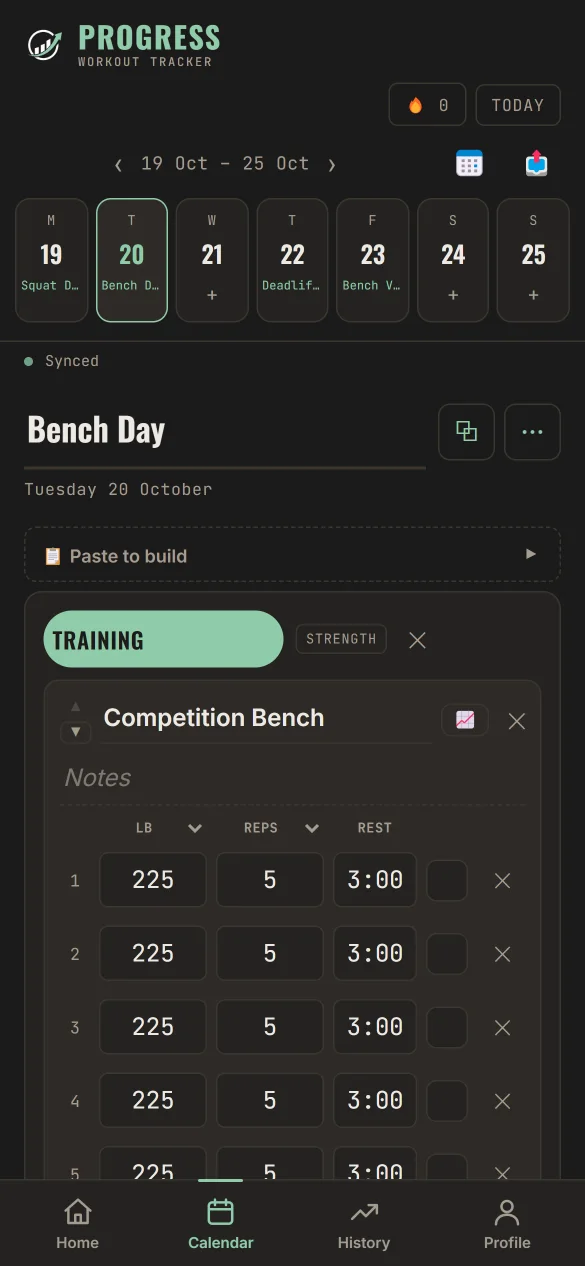
Lifters open Progress and see today's session with a single Start Workout button. They log each set against the plan you wrote, with rest times, lb or kg per set, and automatic PR badges.
- Home screen with today's workout, weekly progress, recent PRs and bodyweight.
- Set-by-set logging against your prescribed loads and rep ranges.
- PR badges that compare lb and kg correctly.
Calculators your lifters already use
No account needed. Send these to athletes ahead of a meet.
Coach FAQ
What does coach access include?
Everything on this page: the Matrix, Progression and Detail builders, paste-to-build, the program library, assigning programs to one or many lifters, and the coaching dashboard with adherence, tags and private client notes.
How much does coach access cost?
Coach access starts at $20 per month. Request access using the form below and you will get setup details.
Can I paste a program from Excel or Google Sheets?
Yes. Paste one day at a time using lines like A1 Back Squat 5 x 3, 1 x 8 180 sec rest. Sections, supersets, set and rep schemes, rep ranges and rest times are all read. Weights are added afterwards in the grid or day editor. Percent-of-max, RPE and tempo are not parsed yet, so put those in the exercise notes.
Can I copy and paste between weeks like in Excel?
Yes. In the Progression view you can drag to select cells, copy with Ctrl+C, paste with Ctrl+V into another week, type new values straight into cells, clear with Delete, and undo with Ctrl+Z. Copies are tab-separated text, so they also paste to and from Excel and Google Sheets.
Does it support both kg and lb?
Yes. The unit is set per set, and personal record comparisons convert between lb and kg correctly.
How do my lifters receive their program?
Assign the program from the program editor or the client list and choose a start date. The workouts appear on each lifter's calendar. If a lifter has not joined yet, you can queue the program on their invite and it is applied when they accept.
Can I change a lifter's training after I assign it?
Yes. Open the lifter's calendar from the coaching dashboard and edit it in the same builder you use for programs.
Is there an app to install?
Progress runs in the browser on phones, tablets and computers, and you can install it to your home screen from the browser (Share, then Add to Home Screen on iPhone). It opens full screen and works without signal, syncing when you are back online. The builder is designed for desktop-size screens, and lifters log their sessions on their phones.
Request coach access
Coach access starts at $20 per month. Tell us a little about your coaching and you will get setup details by email.